Thermal printers are widely used in businesses that require fast and consistent printing for receipts, labels, barcodes, and transaction records. Their performance directly affects daily operations, particularly in retail stores, restaurants, warehouses, logistics facilities, and manufacturing environments. When a printer operates efficiently, employees can complete printing tasks with fewer interruptions and maintain an organized workflow.
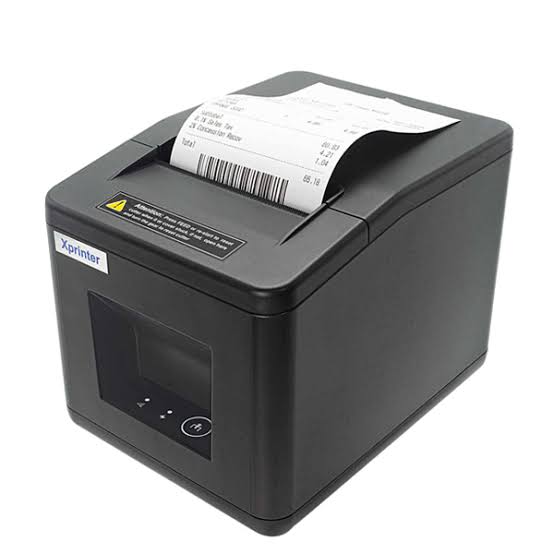
However, printing performance depends on more than the equipment itself. Factors such as printhead quality, paper compatibility, operating conditions, software configuration, and regular maintenance all influence the final output. An Xprinter Thermal Printer can support different business printing requirements when the selected model is properly matched with its intended application. Understanding the factors that affect thermal printer performance helps businesses make informed purchasing and operating decisions.
1. Printhead Quality and Condition
The printhead is one of the most important components of a thermal printer. It contains small heating elements that transfer heat to the printing material to create text, numbers, barcodes, and graphics.
The condition of the printhead has a direct impact on print clarity and consistency. Dust, adhesive residue, paper particles, and regular wear can interfere with heat transfer and result in faded or uneven output.
Several factors influence printhead performance:
- Quality and condition of the heating elements
- Accumulation of dust or printing residue
- Frequency of use
- Compatibility of printing materials
- Correct temperature and darkness settings
- Regular cleaning and maintenance
Keeping the printhead clean and using suitable paper or labels can help maintain consistent printing quality. If printed output contains repeated blank lines or missing sections, the printhead may require inspection.
2. Quality of Thermal Paper and Label Materials
Printing materials play an important role in determining the quality of thermal output. Even a well-functioning printer may produce poor results when used with unsuitable paper or labels.
Direct thermal printers require heat-sensitive materials that react to the printhead’s temperature. The coating must be suitable for the printer’s printing process to produce clear and consistent results.
Important material considerations include:
Thermal coating quality: An even coating supports consistent image formation and helps prevent patchy printing.
Paper thickness: Material thickness should match the printer’s supported specifications to avoid feeding problems.
Surface smoothness: A suitable surface allows consistent contact between the paper and printhead.
Label compatibility: Labels must match the printer’s media requirements, including dimensions and sensor configuration.
Storage conditions: Excessive heat, sunlight, and humidity can affect thermal materials before they are used.
Businesses should select compatible supplies rather than focusing only on the lowest purchase price.
3. Printing Speed and Workload
Printing speed determines how quickly a printer can complete a job. It is particularly important in environments where employees generate receipts or labels throughout the day.
A printer operating in a busy supermarket may handle a different workload from one used occasionally in a small office. If equipment is not suitable for the expected printing volume, it may cause delays during peak periods.
Actual printing speed can depend on:
- The printer’s rated maximum speed
- Print resolution
- Label or receipt dimensions
- Amount of information on each print
- Connection and data transfer performance
- Software and system processing time
Businesses should compare the printer’s specifications with their normal and peak workloads. Selecting a model with appropriate capacity can help maintain smooth operations without placing unnecessary demands on the equipment.
4. Print Resolution and Output Clarity
Print resolution is commonly measured in dots per inch (DPI). It describes how many individual dots a printer can produce within a given area.
Resolution influences the appearance of small text, detailed graphics, and compact barcodes. Higher resolution can be useful when printing detailed information on small labels, while standard receipt printing may not require the same level of detail.
Businesses should consider the intended application before choosing a resolution.
For example, product labels containing small barcodes may require more precise output than basic transaction receipts. However, resolution alone does not guarantee good print quality. Paper compatibility, printhead condition, and correct configuration remain important.
5. Correct Temperature and Darkness Settings
Thermal printers use heat to create printed images. The amount of heat applied to the printing material influences the darkness and clarity of the result.
If the darkness setting is too low, text and barcodes may appear faded. If it is too high, printed areas may become excessively dark, fine details may lose clarity, and unnecessary heat may be applied to the printhead.
The ideal setting depends on the printing material, print speed, printhead condition, and application.
Businesses should follow the recommended settings for their specific printer and make adjustments gradually when necessary. Test printing can help determine whether the selected configuration produces readable output.
6. Proper Paper Loading and Media Alignment
Incorrect paper or label installation can affect both printing quality and operating reliability.
When a roll is positioned incorrectly, the paper may feed unevenly, become misaligned, or trigger detection errors. Label printers may also require appropriate sensor positioning to identify gaps or black marks.
To maintain reliable feeding:
- Use media that matches the printer’s supported dimensions.
- Follow the correct paper-loading direction.
- Position labels evenly within the paper path.
- Avoid forcing the cover closed.
- Check that the roll moves freely.
- Follow model-specific calibration instructions when required.
Correct media installation helps reduce paper jams, alignment problems, and unnecessary printing interruptions.
7. Connectivity and Data Transmission
A thermal printer must receive accurate printing instructions from a connected computer, POS terminal, or other device. Poor connectivity can cause delays, incomplete jobs, or communication errors.
Depending on the model, available connection methods may include USB, Ethernet, Bluetooth, or Wi-Fi.
Each option serves different operational needs. USB is commonly used for direct connections, while Ethernet can support network-based printing environments. Bluetooth and Wi-Fi may be useful for compatible mobile or wireless systems.
Businesses should evaluate the following:
- Connection type supported by the printer
- Compatibility with existing hardware
- Network stability
- Cable condition and connection security
- Driver availability
- Distance between connected devices
A suitable connection method helps ensure that print jobs reach the printer consistently.
8. Driver and Software Compatibility
Printer drivers translate information from an operating system or application into instructions that the printer can process. Incorrect or outdated drivers may result in printing errors, formatting problems, or failed communication.
Software compatibility is especially important when thermal printers are integrated with POS systems, warehouse applications, shipping platforms, and barcode design programs.
Before installation, businesses should confirm:
- The exact printer model.
- The supported operating systems.
- The appropriate driver version.
- Compatibility with the required printing application.
- Support for the necessary printer command language.
- Correct configuration of paper size and print settings.
Using manufacturer-recommended software can help reduce compatibility issues and support reliable operation.
9. Operating Temperature and Environmental Conditions
The environment in which a thermal printer operates can influence its performance and service life.
Excessive heat, humidity, dust, and direct sunlight may affect internal components and printing materials. For example, thermal paper can darken when exposed to high temperatures, while moisture may affect the condition of certain label materials.
Businesses should place printers in suitable locations with adequate ventilation and protection from environmental contaminants.
Useful precautions include:
- Avoiding direct sunlight and nearby heat sources
- Keeping equipment away from liquids
- Maintaining a clean working area
- Preventing dust accumulation
- Using stable surfaces
- Following the manufacturer’s recommended temperature and humidity limits
Industrial and warehouse environments may require equipment specifically designed for more demanding conditions.
10. Regular Cleaning and Preventive Maintenance
Maintenance has a significant influence on long-term printing performance. Dirt and residue can accumulate around the printhead, platen roller, sensors, and paper path during regular operation.
Without cleaning, these contaminants may contribute to faded output, uneven feeding, and barcode printing problems.
A preventive maintenance routine should include:
- Cleaning the printhead with approved materials
- Inspecting the platen roller
- Removing loose paper particles
- Checking accessible sensor areas
- Examining the paper path for obstructions
- Inspecting cables and connectors
- Monitoring print quality for unusual changes
Cleaning frequency should depend on printing volume and environmental conditions. Businesses should follow the maintenance instructions provided for their particular model.
11. Printer Components and Mechanical Durability
A thermal printer contains several mechanical and electronic components that work together to produce output. The condition of these components affects how consistently the device operates.
Important components include the printhead, platen roller, sensors, paper-feeding mechanism, cutter, and power supply.
For example, a worn roller may cause paper slippage, while a damaged cutter may prevent receipts from separating correctly. Faulty sensors can also create paper detection or label positioning problems.
Businesses should inspect equipment periodically and arrange qualified servicing when components show signs of damage. Attempting to repair sensitive internal parts without proper knowledge may create additional problems.
12. Power Supply Stability
Thermal printers require a suitable power supply to operate correctly. An incompatible adapter, unstable electrical connection, or damaged power cable may cause unexpected shutdowns and printing interruptions.
Businesses should use the power adapter specified for their printer model and check that electrical connections are secure.
For commercial environments where power interruptions are common, suitable electrical protection may help reduce the risk of disruption. However, the selected protection equipment should be compatible with the printer’s electrical requirements.
If a printer repeatedly loses power or restarts unexpectedly, the power supply and connected cables should be inspected.
13. Barcode and Label Configuration
Barcode printing performance depends on both the printer and the design of the barcode itself.
Incorrect barcode dimensions, insufficient spacing, unsuitable resolution, or poor contrast can make printed codes difficult to scan. These problems may occur even when the printer is mechanically sound.
Businesses should verify:
- Correct barcode format
- Suitable barcode dimensions
- Adequate spacing around the code
- Appropriate print resolution
- Clear contrast between printed areas and the label
- Compatibility with barcode scanning equipment
Printing sample labels and testing them with the scanners used in daily operations can help identify configuration issues before large production runs.
14. How Different Applications Influence Printer Performance
Thermal printers are used for various tasks, and each application creates different performance requirements.
| Application | Important Performance Requirements |
|---|---|
| Retail receipts | Fast output, clear text, and POS compatibility |
| Product labels | Suitable resolution, accurate media feeding, and barcode readability |
| Shipping labels | Appropriate label dimensions and reliable software integration |
| Warehouse identification | Consistent printing and support for frequent workloads |
| Restaurant order tickets | Fast printing and dependable connectivity |
| Industrial labels | Durable printing materials and suitable operating conditions |
| Event tickets | Readable text, consistent output, and appropriate ticket media |
Choosing a printer according to its intended use helps businesses avoid performance problems caused by unsuitable equipment selection.
15. Practical Ways to Improve Thermal Printer Performance
Businesses can improve printing reliability by combining appropriate equipment selection with consistent operating practices.
Some useful recommendations include:
- Choose the right model: Match the printer’s specifications with daily printing volume and application requirements.
- Use compatible materials: Select paper, labels, and ribbons according to the printing method.
- Maintain suitable settings: Configure speed, darkness, and resolution according to the required output.
- Keep software updated: Use compatible drivers and manufacturer-supported applications.
- Clean the equipment: Follow a regular maintenance routine based on usage.
- Monitor print quality: Investigate fading, missing lines, and barcode scanning failures promptly.
- Train employees: Make sure operators understand correct loading, cleaning, and troubleshooting procedures.
These practices help create a more reliable printing environment and reduce avoidable interruptions.
Conclusion
The performance of thermal printers depends on several connected factors, including printhead condition, printing materials, resolution, speed, software compatibility, connectivity, environmental conditions, and maintenance. Each factor contributes to the quality and consistency of printed receipts, labels, and barcodes.
Businesses should evaluate these requirements before selecting equipment and follow model-specific operating guidelines after installation. By using compatible supplies, maintaining suitable settings, and inspecting essential components regularly, they can support reliable printing performance and improve the efficiency of everyday business operations.