Receipt printers are essential equipment for businesses that process regular customer transactions. Retail stores, restaurants, supermarkets, pharmacies, and service counters rely on these devices to produce clear receipts and maintain organized payment records. However, choosing the right printer requires more than comparing prices. Businesses need to consider printing performance, connectivity, compatibility, paper requirements, and long-term maintenance.
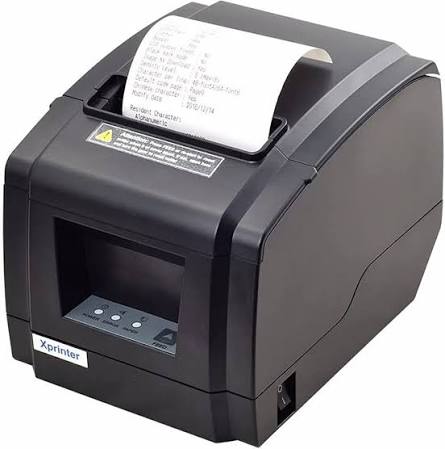
An Xprinter Receipt Printer can support daily point-of-sale operations when its specifications match the needs of the business. Different models may offer different printing technologies, interfaces, and performance capabilities. Understanding these features before purchasing helps businesses select equipment that fits their workflow and avoids unnecessary operational difficulties.
1. Printing Technology
One of the first factors to consider is the printing technology used by the device. Most receipt printers use either thermal or impact printing.
Thermal printers create text and images by applying heat to specially coated paper. They are commonly used in retail environments because they generally operate quietly, print quickly, and do not require ink cartridges or ribbons.
Impact printers use a print head and ribbon to transfer information onto paper. They can be useful in applications that require multi-part forms or specific paper types.
Businesses should choose the technology according to their document requirements, working environment, and expected printing volume.
2. Printing Speed and Performance
Printing speed directly affects checkout efficiency, especially in businesses that process many transactions throughout the day. A printer that produces receipts quickly can help reduce delays between payment confirmation and transaction completion.
When comparing models, check the manufacturer’s stated printing speed and consider how it performs under typical operating conditions. Other factors, such as connection quality, software configuration, and receipt complexity, can also influence actual output time.
High-traffic supermarkets and busy restaurants may benefit from faster models, while smaller businesses may have more flexible performance requirements.
3. Print Resolution and Clarity
Receipt information must be easy to read. Customers should be able to identify product names, prices, taxes, discounts, and payment details without difficulty.
Print resolution affects the appearance of small text, logos, barcodes, and QR codes. Businesses that include scannable information on receipts should check whether the selected model supports the required barcode formats and printing quality.
It is also important to use suitable receipt paper because paper quality can influence the sharpness and consistency of printed output.
4. Connectivity Options
A receipt printer must communicate reliably with the POS system. Different models may support different connection methods, so businesses should check their existing hardware before purchasing.
Common connectivity options include:
- USB: Suitable for direct connections to computers and compatible POS terminals.
- Ethernet: Useful for network-based installations and shared printing environments.
- Serial: Available in certain traditional POS configurations.
- Bluetooth: Can support wireless connections with compatible mobile devices.
- Wi-Fi: May provide flexible network connectivity where supported.
The right interface depends on the checkout layout, device compatibility, and whether the printer needs to operate independently or as part of a network.
5. Paper Width and Roll Capacity
Receipt printers support specific paper widths and roll dimensions. Common receipt formats include narrower rolls for compact transactions and wider rolls for detailed purchase records.
Before choosing a model, verify the supported paper width, maximum roll diameter, and paper type. These specifications determine which supplies can be used and how frequently employees need to replace rolls.
A larger supported roll capacity may be useful in busy environments because it can reduce interruptions caused by frequent paper changes.
6. Compatibility With POS Software
Hardware compatibility is one of the most important purchasing considerations. A printer may have suitable physical specifications but still create problems if it does not work with the business’s POS software.
Check operating system support, available drivers, interface requirements, and supported printer command languages. If the business uses specialized billing or inventory software, confirm compatibility before placing an order.
Testing the printer with the actual POS application can help identify configuration issues before full deployment.
7. Design and Installation Requirements
The physical design of a printer can affect how easily it fits into a working environment. Compact models are useful for counters with limited space, while certain installations may require wall-mounting or specific positioning options.
Consider the available counter area, cable arrangement, paper-loading method, and access to the printer during maintenance. Easy paper replacement and straightforward installation can make daily operations more convenient for employees.
8. Durability and Maintenance
A receipt printer used throughout the day should be suitable for its expected workload. Businesses should review the manufacturer’s specifications for operating conditions, component life, and recommended usage limits.
Maintenance requirements also deserve attention. Thermal print heads, paper paths, rollers, and other components may need periodic cleaning or inspection.
Choose a model with accessible maintenance guidance and consider the availability of replacement parts. Proper care can help maintain print quality and reduce avoidable downtime.
9. Additional Features for Business Needs
Some receipt printers provide additional functions that may improve their usefulness in specific applications. Depending on the model, these can include automatic cutters, status indicators, cash drawer connections, or support for different barcode formats.
An automatic cutter can help separate receipts neatly, while status indicators can make it easier to identify paper or device errors. However, not every business needs every feature. Prioritize functions that directly support the intended POS workflow.
How to Select the Right Model for Your Business
The best choice depends on the type of business and its daily printing requirements.
A small retail shop may prioritize affordability, compact design, and simple USB connectivity. A supermarket may need higher printing performance and reliable operation during peak hours. Restaurants may require additional connectivity flexibility to support separate cashier and kitchen printing stations.
Before making a final decision, prepare a list of essential requirements and compare available models against those specifications. Review technical documentation, confirm software compatibility, and evaluate ongoing paper and maintenance costs.
Conclusion
Choosing a suitable receipt printer involves evaluating several factors, including printing technology, speed, resolution, connectivity, paper compatibility, software support, and durability. Each feature contributes to how effectively the device performs within a business environment.
By comparing these specifications with actual operational needs, businesses can select a printer that supports reliable transactions and organized checkout processes. A careful purchasing decision can also reduce compatibility problems and help maintain consistent printing performance over time.