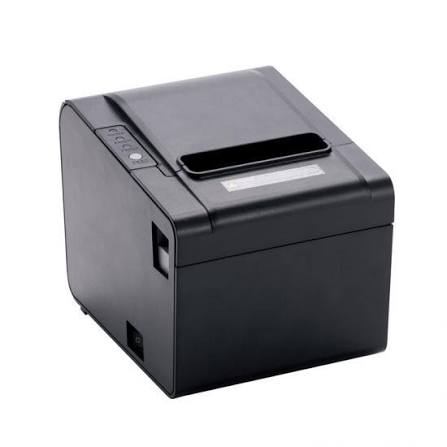
Thermal receipt printers are widely used in retail stores, restaurants, supermarkets, pharmacies, and service centers to produce transaction records quickly. Because these devices often operate throughout the working day, regular maintenance is essential for maintaining consistent print quality and preventing unexpected interruptions. Dust, paper residue, worn components, and incorrect handling can gradually affect performance if they are not addressed.
A Thermal Receipt Printer uses a heat-sensitive printhead to create text and graphics on specially coated paper. Although this technology eliminates the need for traditional ink and toner, it still requires proper cleaning, suitable supplies, and routine inspections. Following a practical maintenance schedule can help businesses extend equipment life, reduce repair expenses, and maintain reliable printing performance.
Why Regular Thermal Printer Maintenance Matters
Maintenance helps keep the printer’s mechanical and electronic components working correctly. Over time, paper dust and other contaminants can accumulate around the printhead and paper-feeding mechanism. These materials may affect printing consistency and cause unnecessary wear.
Regular care offers several benefits:
- Consistent print quality: Clean components help produce readable text and clear graphics.
- Reduced equipment downtime: Early detection of minor problems can prevent unexpected failures.
- Longer component life: Proper handling reduces unnecessary stress on the printhead and rollers.
- Lower repair expenses: Preventive maintenance can reduce the need for avoidable repairs.
- Reliable daily operation: Well-maintained equipment is better prepared for regular transaction workloads.
For businesses that process many transactions, these benefits can contribute to smoother checkout operations.
1. Clean the Thermal Printhead Regularly
The thermal printhead is one of the most important components of the printer. It contains small heating elements that activate the thermal coating on the paper.
Dust, paper particles, and residue can accumulate on its surface. This may cause faded printing, uneven darkness, or missing lines.
To clean the printhead safely:
- Turn off the printer and disconnect its power supply.
- Allow the printhead to cool if the device has been operating.
- Open the printer cover according to the manufacturer’s instructions.
- Use an approved printhead cleaning pen or lint-free material with a recommended cleaning solution.
- Gently clean the printhead surface without applying excessive pressure.
- Allow the area to dry completely before closing the cover and restarting the printer.
Avoid using sharp tools, abrasive materials, or unsuitable chemicals. These can scratch or damage the sensitive heating elements.
The cleaning frequency should depend on printing volume, paper quality, and the manufacturer’s recommendations.
2. Inspect and Clean the Platen Roller
The platen roller moves thermal paper through the printing mechanism while maintaining contact with the printhead.
If the roller becomes dirty or worn, paper movement may become inconsistent. This can result in distorted characters, uneven spacing, or feeding problems.
During routine maintenance, inspect the roller for visible damage, accumulated debris, or unusual surface wear.
Clean it using the method and materials recommended by the manufacturer. Avoid excessive pressure or cleaning products that could damage the roller’s surface.
If the roller becomes cracked, deformed, or unable to feed paper correctly, it may need professional inspection or replacement.
3. Use High-Quality Compatible Thermal Paper
Paper quality has a direct influence on printing results and equipment condition. Thermal paper contains a specialized coating that reacts to heat from the printhead.
Incompatible or poor-quality paper may produce faded output, inconsistent darkness, and excessive paper residue.
Businesses should consider the following when purchasing thermal paper:
- Correct paper width and roll diameter.
- Compatibility with the printer model.
- Consistent coating quality.
- Appropriate thickness and surface characteristics.
- Reliable supplier specifications.
Using suitable paper helps maintain clear receipts and reduces the likelihood of problems caused by incompatible materials.
It is also important to avoid paper rolls with damaged edges, wrinkles, or excessive dust.
4. Store Thermal Paper Under Suitable Conditions
Thermal paper is sensitive to environmental conditions. Excessive heat, sunlight, moisture, and certain chemicals can affect its coating and cause discoloration or fading.
Even unused paper rolls can become unsuitable if stored incorrectly.
For better storage conditions:
- Keep paper rolls in a cool, dry location.
- Avoid placing them near heaters or direct sunlight.
- Store rolls in their original packaging when possible.
- Keep paper away from cleaning chemicals and solvents.
- Avoid areas with excessive humidity.
- Follow the paper manufacturer’s storage recommendations.
Proper storage helps preserve paper quality before it enters the printer.
5. Keep the Paper Compartment Free From Dust
Dust and small paper particles can collect inside the printer during regular use. If these materials accumulate, they may interfere with the paper-feed mechanism or contaminate the printhead.
Open the paper compartment during scheduled cleaning and remove loose debris carefully.
Use a soft brush or other manufacturer-approved cleaning material. Avoid blowing debris deeper into the printer with excessive air pressure.
A clean paper compartment supports smooth paper movement and reduces the possibility of printing defects.
6. Load Paper Rolls Correctly
Incorrect paper installation is a common cause of printing interruptions.
If the roll is inserted in the wrong direction, the thermal coating may not face the printhead. As a result, the printer may feed paper without producing visible text.
Employees should follow the loading instructions provided with the equipment.
A proper paper-loading process generally involves:
- Opening the printer cover.
- Removing the empty roll or remaining paper core.
- Placing the new roll in the designated compartment.
- Confirming that the thermal coating faces the correct direction.
- Pulling a small amount of paper beyond the cutting edge.
- Closing the cover securely.
- Printing a test receipt to confirm correct operation.
Training employees to follow these steps can reduce avoidable printing problems.
7. Check the Automatic Cutter
Many thermal receipt printers include an automatic cutter that separates receipts after printing.
Over time, paper fragments and debris can accumulate around the cutting mechanism. This may result in incomplete cuts, unusual noise, or paper jams.
Businesses should inspect the cutter periodically and follow the manufacturer’s cleaning and maintenance instructions.
Never attempt to remove trapped paper with sharp tools while the printer is powered on. If the cutter becomes stuck or stops working correctly, switch off the equipment and consult the user manual or a qualified technician.
For high-volume environments, checking cutter operation should be part of the regular maintenance routine.
8. Monitor Print Quality for Early Warning Signs
Changes in print quality can indicate that a component needs cleaning, adjustment, or replacement.
Employees should pay attention to common warning signs:
| Printing Problem | Possible Cause |
|---|---|
| Faded text | Low darkness setting, unsuitable paper, or printhead wear |
| Missing vertical lines | Dirty or damaged printhead elements |
| Uneven darkness | Paper quality issues or inconsistent printhead contact |
| Blurry characters | Incorrect settings or unsuitable paper |
| Blank receipts | Incorrect paper orientation or printing configuration |
| Distorted spacing | Paper-feed or roller problems |
These symptoms do not always have a single cause. Businesses should check basic settings and paper compatibility before assuming that a component has failed.
Identifying changes early can prevent minor problems from disrupting daily operations.
9. Maintain Proper Printer Settings
Incorrect configuration can affect printing quality and place unnecessary demands on the equipment.
Print darkness is one important setting. If the darkness level is too low, receipts may be difficult to read. If it is unnecessarily high, the printhead may receive more heat than required.
Businesses should select settings that provide clear output while following the manufacturer’s recommendations.
Other settings worth checking include:
- Paper width.
- Print density.
- Printing speed.
- Character and font configuration.
- Cutter operation.
- Communication and interface settings.
After changing settings, print a test receipt to confirm that the output remains clear and properly aligned.
10. Check Cables, Power Supply, and Connectivity
Thermal printers rely on stable power and reliable communication with connected devices.
Loose cables, damaged connectors, or unstable network connections can cause printing delays and unexpected interruptions.
During routine inspections, employees should check that:
- Power cables are securely connected.
- Adapters match the manufacturer’s specifications.
- USB or Ethernet cables are not damaged.
- Wireless connections remain stable.
- The printer is correctly recognized by the POS system.
- Indicator lights show normal operating status.
Avoid bending cables sharply or placing heavy objects on them. If a power adapter or connector becomes damaged, replace it with a compatible component rather than attempting an improvised repair.
11. Keep the Printer in a Suitable Operating Environment
The location of a thermal receipt printer can influence its long-term reliability.
Excessive heat, moisture, dust, and physical impacts can affect electronic components and mechanical parts.
For better operating conditions, businesses should:
- Place printers on stable, level surfaces.
- Keep equipment away from direct sunlight.
- Avoid locations exposed to water or excessive humidity.
- Allow sufficient ventilation around the device.
- Keep the printer away from heavy dust and grease.
- Prevent objects from blocking paper exits or ventilation openings.
Restaurants and industrial environments may require additional attention because grease, airborne particles, and frequent handling can increase contamination risks.
12. Follow a Preventive Maintenance Schedule
A consistent maintenance schedule makes it easier to identify problems before they affect daily operations.
The exact frequency should depend on the printer model, transaction volume, environment, and manufacturer guidance.
A general maintenance checklist can help employees organize routine tasks.
| Maintenance Task | Suggested Frequency |
|---|---|
| Check paper supply and loading | Daily |
| Inspect print quality | Daily |
| Remove loose paper debris | Weekly |
| Clean printhead | According to usage and manufacturer guidance |
| Inspect platen roller | Regularly |
| Check cables and connections | Monthly |
| Inspect cutter operation | Regularly |
| Review overall equipment condition | Periodically |
Businesses with heavy printing workloads may need more frequent cleaning and inspections than locations with occasional receipt printing.
13. Train Employees in Basic Printer Care
Employee handling plays an important role in equipment reliability. Even a well-designed printer can develop problems when paper is loaded incorrectly or components are cleaned using unsuitable materials.
Basic staff training should cover:
- Correct paper installation.
- Safe printer opening and closing procedures.
- Recognizing common print-quality issues.
- Basic paper-jam removal.
- Proper shutdown procedures.
- When to contact technical support.
Employees should also understand which maintenance tasks they can perform safely and which repairs require a qualified technician.
Clear operating procedures help prevent accidental damage and reduce unnecessary service calls.
14. Know When Professional Servicing Is Necessary
Routine cleaning can resolve many minor issues, but some problems require professional attention.
Technical support may be necessary when the printer experiences repeated paper jams, persistent missing print lines, unusual mechanical noises, power failures, or cutter malfunctions.
Professional servicing is also advisable when internal components need replacement or when a fault continues after basic troubleshooting.
Businesses should avoid dismantling electronic components without the required technical knowledge. Incorrect repairs can cause additional damage and may affect warranty coverage.
Keeping records of recurring problems, maintenance activities, and replacement parts can also help technicians diagnose equipment more efficiently.
Conclusion
Maintaining a thermal receipt printer for long-term performance requires regular cleaning, compatible paper supplies, correct loading procedures, and attention to environmental conditions. The printhead, platen roller, paper-feed mechanism, and automatic cutter all need appropriate care to support consistent operation.
Businesses can reduce avoidable downtime and extend equipment life by following manufacturer recommendations, training employees, and adopting a preventive maintenance schedule. With proper handling and timely servicing, thermal receipt printers can continue producing clear receipts and supporting reliable transaction workflows over extended periods.