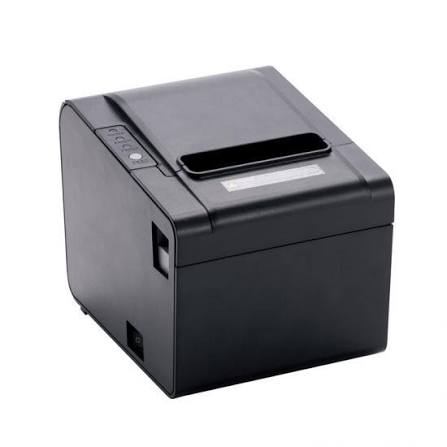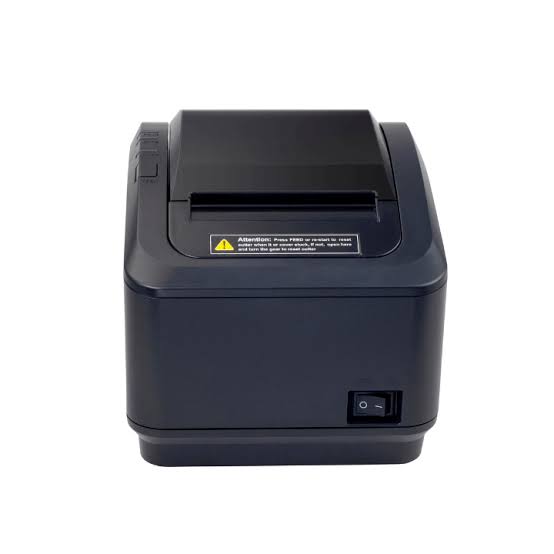
Choosing the right receipt printer is an important decision for businesses that process customer payments and issue transaction records regularly. The printer must work efficiently with existing point-of-sale systems, handle the expected transaction volume, and produce clear receipts without creating unnecessary maintenance costs. A suitable device can help improve checkout speed, support accurate recordkeeping, and make daily operations more organized.
However, not every business has the same printing requirements. A small retail shop may need a compact printer for occasional transactions, while a busy supermarket or restaurant may require equipment designed for continuous operation. Selecting the right Receipt Printer involves evaluating several factors, including printing technology, speed, connectivity, paper compatibility, durability, and total operating costs.
1. Understand Your Business Printing Requirements
The first step is to identify how and where the printer will be used. Different industries have different transaction processes, and these requirements influence the most suitable printer type.
Consider the following questions:
- How many receipts does the business print each day?
- Will the printer operate at a fixed checkout counter or in multiple locations?
- Does the business need standard sales receipts, kitchen orders, tickets, or duplicate documents?
- How much workspace is available?
- Will employees use one printer or share printing equipment across several terminals?
For example, a convenience store may prioritize fast printing during busy checkout periods. A restaurant may need separate printers for customer receipts and kitchen orders. Understanding these requirements helps narrow the available options.
2. Select the Appropriate Printing Technology
Receipt printers use different technologies, and each has advantages depending on the application.
Thermal Printing
Thermal printers use heat to create images on specially coated paper. They do not require traditional ink cartridges or ribbons, making them a common choice for modern POS systems.
Their main advantages include:
- Fast printing for frequent transactions
- Quiet operation in customer-facing environments
- Relatively simple routine maintenance
- Compact designs suitable for checkout counters
Thermal printers are often appropriate for retail stores, supermarkets, cafés, and restaurants. However, thermal receipts may fade when exposed to excessive heat, sunlight, or certain chemicals.
Impact Printing
Impact printers use pins and an ink ribbon to produce characters on paper. They are generally slower and noisier than thermal models but can support multipart forms.
This technology may be useful in commercial kitchens, industrial environments, and businesses that require duplicate transaction documents.
Other Printing Technologies
Inkjet printing is less common in standard POS receipt applications but may suit specialized requirements involving color or detailed graphics. Businesses should compare its ink consumption and maintenance needs with the benefits of its output.
3. Evaluate Printing Speed and Daily Capacity
Printing speed directly affects checkout efficiency, particularly in businesses that process many transactions during peak hours. If a printer takes too long to produce each receipt, customers may experience unnecessary delays.
When comparing models, review the manufacturer’s stated printing speed, usually measured in millimeters per second. Also consider whether the printer can maintain consistent performance during extended periods of use.
A busy supermarket, for example, may benefit from a faster model that can handle frequent printing without interrupting checkout operations. A small business with fewer daily transactions may not need the same performance level.
It is also important to consider the printer’s overall duty cycle and recommended operating conditions rather than relying on speed specifications alone.
4. Check Connectivity Options
Connectivity determines how the printer communicates with POS terminals, computers, tablets, and other business devices. The correct interface depends on the existing system and how employees manage transactions.
Common connectivity options include:
USB
USB printers connect directly to compatible POS terminals or computers. They are generally easy to install and work well for individual checkout stations.
Ethernet
Ethernet connectivity allows printers to communicate through a local network. This can be useful when several terminals need access to shared printing equipment.
Bluetooth
Bluetooth is commonly available in portable receipt printers. It allows compatible mobile devices to send print jobs without requiring a physical cable.
Wi-Fi
Wi-Fi connectivity can provide wireless printing across supported networks. It may be suitable for restaurants, retail environments, and mobile POS arrangements where flexible printer placement is important.
Before purchasing, confirm that the selected interface is supported by the business’s hardware, operating system, and POS software.
5. Consider Paper Size and Compatibility
Receipt printers support specific paper widths and roll dimensions. Common formats include 58 mm and 80 mm thermal paper, although available sizes vary by model.
The appropriate paper width depends on the amount of information printed on each receipt. Smaller receipts may be sufficient for simple purchases, while wider formats can accommodate detailed product descriptions, business information, promotional messages, and transaction summaries.
Businesses should also check:
- Supported paper roll diameter
- Paper loading method
- Paper thickness requirements
- Print resolution and text clarity
- Availability of compatible paper supplies
Using the correct paper helps maintain consistent output and reduces the risk of feeding problems or printing defects.
6. Assess Printer Durability and Build Quality
A receipt printer used throughout the working day must withstand regular handling and repeated printing. Durability is especially important in supermarkets, restaurants, transportation services, and other high-traffic environments.
Review the construction quality, print-head specifications, cutter performance, and manufacturer’s recommended operating conditions. A printer with a suitable design for frequent use can reduce interruptions and help control long-term maintenance expenses.
Environmental conditions also matter. Kitchens may expose equipment to heat, moisture, and food particles, while warehouses may involve dust and frequent handling. Businesses should select equipment appropriate for the environment in which it will operate.
7. Review POS Software and System Compatibility
A printer may have suitable hardware specifications but still create difficulties if it cannot communicate properly with the existing POS system.
Before purchasing, check whether the model supports the required operating systems, printer drivers, command languages, and POS applications. Compatibility with common printing standards can also simplify integration.
For businesses using specialized software, it is useful to confirm compatibility with the software provider or printer manufacturer before installation. Testing the printer with the actual checkout system can help identify configuration problems early.
8. Compare Initial Price and Total Cost of Ownership
The cheapest printer is not always the most economical choice over time. Businesses should consider the complete cost of operating and maintaining the equipment.
Important cost factors include:
- Initial purchase price
- Receipt paper consumption
- Ink ribbons or cartridges, if required
- Replacement print heads and cutters
- Maintenance and repair expenses
- Software or integration requirements
- Expected service life
Thermal printers may reduce routine consumable expenses because they do not use traditional ink cartridges or ribbons. However, paper quality, print-head condition, and replacement-part availability should still be considered.
Comparing total ownership costs gives businesses a more realistic understanding of long-term value.
9. Choose Between Desktop and Mobile Models
The printer’s physical design should match the way employees handle transactions.
Desktop Receipt Printers
Desktop models are designed for fixed workstations. They are commonly used at retail checkout counters, pharmacy service desks, and restaurant cashier stations.
Their advantages include stable placement, convenient paper loading, and compatibility with stationary POS systems.
Mobile Receipt Printers
Mobile printers are compact devices that often use rechargeable batteries and wireless connectivity. They are useful for employees who process payments away from fixed counters.
Delivery personnel, field service teams, outdoor vendors, and mobile sales staff may benefit from portable printing capabilities.
The decision should depend on whether transactions take place at a designated checkout point or across multiple locations.
10. Examine Maintenance and Technical Support
Regular maintenance helps preserve printing quality and reduce unexpected downtime. Before selecting a model, understand its cleaning requirements, available replacement parts, and technical support arrangements.
Useful maintenance considerations include:
- Cleaning the print head according to manufacturer instructions
- Removing paper dust and debris from the paper path
- Using compatible paper rolls
- Checking cutter performance where applicable
- Keeping firmware and drivers updated when required
- Following recommended operating and storage conditions
Businesses should also consider warranty coverage and the availability of technical assistance. Accessible support can be particularly important for operations that depend on uninterrupted transaction processing.
11. Consider Future Business Growth
A printer that meets current requirements may become unsuitable as transaction volumes increase or the business expands. Selecting equipment with appropriate connectivity and system compatibility can provide greater flexibility.
For example, a retailer planning to introduce additional checkout terminals may benefit from network-compatible printing options. A restaurant expanding its mobile ordering services may need wireless printers that work with its updated POS environment.
Thinking about future requirements can help businesses avoid replacing equipment too quickly.
Common Mistakes to Avoid When Buying a Receipt Printer
Even when businesses compare several models, certain purchasing mistakes can lead to unnecessary expenses or operational problems.
Choosing based only on price: A low-cost printer may lack the durability or features required for frequent use.
Ignoring software compatibility: A printer that does not work with the existing POS system can create installation and integration difficulties.
Overlooking paper specifications: Selecting an incompatible paper size can affect receipt formatting and daily operations.
Underestimating transaction volume: Equipment designed for occasional printing may struggle in a high-traffic environment.
Neglecting after-sales support: Limited access to replacement parts or technical assistance can increase downtime.
Avoiding these mistakes makes it easier to select equipment that supports business operations over the long term.
Conclusion
Choosing the right receipt printer requires a clear understanding of business needs, transaction volume, printing technology, connectivity, paper compatibility, and maintenance requirements. Thermal printers are suitable for many everyday POS applications, while impact and mobile models address more specialized printing environments.
Businesses should compare technical specifications alongside software compatibility, durability, and total ownership costs. By evaluating both current operations and future growth plans, they can select a receipt printing solution that supports efficient transactions, reliable performance, and organized customer service.