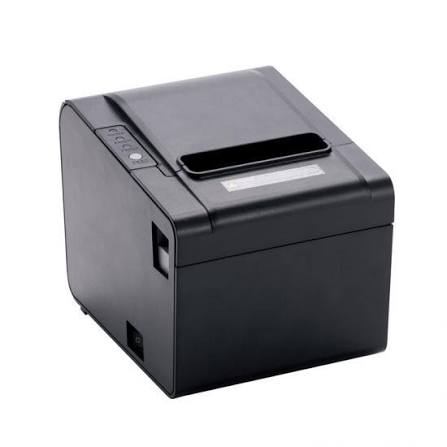
Replacing point-of-sale equipment can become a significant expense for businesses, especially when terminals, scanners, printers, and other components fail before their expected lifespan. Beyond the hardware itself, companies may also face installation, configuration, training, and downtime costs that can disrupt daily operations. Working with the right POS Hardware Supplier can help businesses make better purchasing decisions and reduce unnecessary replacement expenses.
A reliable supplier can provide guidance on selecting hardware that matches a business’s operating environment, transaction volume, and software requirements. This approach helps prevent businesses from investing in equipment that is either unsuitable for their needs or unnecessarily expensive. Choosing compatible, durable hardware from the beginning can reduce the likelihood of premature replacement.
Choose Hardware Based on Business Needs
One of the most effective ways to control replacement costs is to select equipment according to actual operational requirements. A small retail store may not need the same hardware specifications as a busy restaurant, warehouse, or multi-location retailer.
Suppliers can help businesses assess factors such as:
- Expected transaction volume
- Operating hours
- Available workspace
- Software and peripheral compatibility
- Environmental conditions
- Future expansion plans
Matching equipment to these requirements can prevent both under-specification and unnecessary overspending.
Prioritize Durability and Build Quality
Low-cost hardware may appear attractive initially, but frequent failures can make it more expensive over time. POS equipment is often used continuously, making durability an important consideration when calculating its total cost of ownership.
Businesses should consider construction quality, expected operating life, warranty coverage, and manufacturer reliability rather than focusing only on the initial purchase price. More durable equipment can remain productive longer and reduce the frequency of replacement cycles.
Improve Hardware Compatibility
Compatibility problems can shorten the useful life of POS equipment. A new device may work poorly with existing software, operating systems, payment systems, or peripheral devices, creating additional costs and operational complications.
Experienced suppliers can help businesses identify compatible components before a purchase is made. This can reduce failed installations and prevent companies from replacing equipment simply because different systems cannot work together effectively.
Consider Repair and Replacement Support
Equipment does not always need to be replaced when a problem occurs. In some cases, a faulty component can be repaired or replaced individually, allowing the rest of the system to remain in service.
Supplier support can make it easier to determine whether repair, component replacement, or full system replacement is the most practical option. Having access to appropriate technical assistance can also reduce downtime while a problem is being resolved.
Maintain Equipment Properly
Regular maintenance can extend the useful life of POS hardware. Dust, heat, power fluctuations, improper handling, and outdated firmware can all contribute to equipment problems.
Businesses can reduce avoidable failures by keeping equipment clean, maintaining appropriate operating conditions, checking cables and connections, and applying relevant software or firmware updates. Simple maintenance practices can delay the need for costly replacements.
Evaluate the Total Cost of Ownership
The purchase price is only one part of the cost of POS hardware. Businesses should also consider installation, maintenance, repairs, accessories, warranties, energy consumption, and potential downtime.
A slightly more expensive system may ultimately provide better value if it lasts longer and requires fewer repairs. Comparing total ownership costs gives businesses a more accurate basis for purchasing decisions.
Plan for Future Growth
Replacing equipment because a business has outgrown its existing system can create avoidable expenses. Companies should consider expected growth when selecting POS hardware, particularly if they anticipate adding locations, increasing transaction volumes, or introducing new payment methods.
Choosing scalable equipment can allow businesses to expand without replacing an entire POS setup. This can make future upgrades more manageable and reduce the cost of major system changes.
Use a Replacement Strategy Instead of Waiting for Failure
Reactive replacement often results in rushed purchasing decisions. When essential hardware fails unexpectedly, businesses may have limited time to compare options and may choose whatever equipment is immediately available.
A planned replacement strategy allows companies to monitor hardware age, performance, warranty status, and maintenance history. Equipment can then be upgraded before failure causes significant disruption.
Conclusion
POS hardware replacement costs can be reduced through careful selection, proper maintenance, compatibility checks, and long-term planning. Businesses that evaluate durability and total cost of ownership are better positioned to avoid frequent and unnecessary equipment purchases.
A knowledgeable supplier can also help businesses determine when repair makes sense, which components need upgrading, and what hardware is appropriate for future requirements. By treating POS equipment as a long-term operational investment rather than a one-time purchase, businesses can improve reliability while keeping replacement costs under control.